do u wanna c magic of microsoft word...try this
Open Microsoft Word and type
=rand (200, 99)
And then press ENTER
And see the
magic?..!
Saturday, December 18, 2010


Your personal digital diary using notepad on computer
Many a times you need your own personal diary on
computer which store your work with current time and
date..this is possible simply with notepad. try this

1.open notepad
2.type .LOG and save it with
anyname.txt(eg:diary.txt)
3.now write whatever u wish everytime u open a
timestamp appear first i.e date and time.
4.so finally u have your personal diary with time and
date stored automatically on ur pc
computer which store your work with current time and
date..this is possible simply with notepad. try this

1.open notepad
2.type .LOG and save it with
anyname.txt(eg:diary.txt)
3.now write whatever u wish everytime u open a
timestamp appear first i.e date and time.
4.so finally u have your personal diary with time and
date stored automatically on ur pc
Thursday, December 16, 2010
WINDOWS CALCULATOR BUG
I learnt 2-2=0,but microsoft windows calculator simply does not agree with me.try this
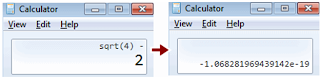
Step 2 : Press the number 4 and apply Square root which gives result 2.
Step 3 : Now subtract 2 from the answer ie, 2-2 and press equals [=]

Step 1 : Open Windows Calculator.
Step 2 : Press the number 4 and apply Square root which gives result 2.
Step 3 : Now subtract 2 from the answer ie, 2-2 and press equals [=]
GO GREEN:CHARGE YOUR MOBILE BATTERY WITHOUT ELECTRICITY
It is possible in this technology world.Just get two green leaves from peepal tree, it charges your mobile.How?

Here is the procedure:
1. Open your mobile back cover.
2. Take out your mobile battery.
3. Take the leaves.
4. Hold the stub of the leaves on mobile battery terminal for two minutes.
5.Put your battery into your mobile and get shock!
6.Now your battery became charged.

Here is the procedure:
1. Open your mobile back cover.
2. Take out your mobile battery.
3. Take the leaves.
4. Hold the stub of the leaves on mobile battery terminal for two minutes.
5.Put your battery into your mobile and get shock!
6.Now your battery became charged.
MAKE YOUR COMPUTER TALK TO YOU AS YOU WISH
Hello everyone,
This is a small piece of code that will make your computer to talk to you
HOW TO INSTALL AND USE THIS CODE:
1.open notepad
2.copy paste the following code in notepad
Dim input
Wscript.Echo "CREATED BY DARSHIT VORA"
input = InputBox("Write a message for me to say","SPEAK TO ME")
Set speech = Wscript.CreateObject("SAPI.SpVoice")
speech.speak input
This is a small piece of code that will make your computer to talk to you
HOW TO INSTALL AND USE THIS CODE:
1.open notepad
2.copy paste the following code in notepad
Dim input
Wscript.Echo "CREATED BY DARSHIT VORA"
input = InputBox("Write a message for me to say","SPEAK TO ME")
Set speech = Wscript.CreateObject("SAPI.SpVoice")
speech.speak input
3.goto file ->save .choose save as file type as all file and save the file as anyname.vbs (eg: speakapp,vbs)
4.double click on the file.type whatever you want your computer to speak....and njoyyy
Subscribe to:
Posts (Atom)